What is a People-Centered Approach?
- Interaction design is closely tied with UCD and relies on understanding and including users during the design process.
Basic Principles
- Several decades ago, when the field of HCI was being established, John Gould and Clayton Lewis laid down three principles that they believed would lead to a “useful and easy to use computer system.
Early Focus on Users and Tasks
- This means first understanding who the users will be by directly studying their cognitive, behavioral, anthropomorphic, and attitudinal characteristics.
- This requires observing users doing their normal tasks, studying the nature of those tasks, and then involving users in the design process.
Empirical Measurement
- Early in development, the reactions and performance of intended users to printed scenarios, manuals, and so forth, are observed and measured.
- Later, users interact with simulations and prototypes, and their performance and reactions are observed, recorded, and analyzed.
Iterative Design
- When problems are found in user testing, they are fixed, and then more tests and observations are carried out to see the effects of the fixes.
- This means that design and development are iterative, with cycles of design-test-measure-redesign being repeated as often as necessary.
Further Principles
- In a people centered approach, the basic principles form the basis for designing with people, communities, and other stakeholders and are expanded through the following further principles:
People are the Driving Force
- People’s tasks and goals are the driving force behind the development.
- While technology will inform design options and choices, it is not the driving force.
- Instead of looking at how the new technology can be deployed, ask what technologies are available to provide better support for people’s goals.
- People’s behavior and context of use are studied, and the system is designed to support them.
- This is not just about capturing people’s tasks and goals.
- How people perform their tasks is also significant.
- Understanding behavior highlights priorities, preferences, and implicit intentions.
Designing for People
- People’s characteristics are captured and designed for.
- People are prone to making errors and have certain limitations, both cognitive and physical.
- Products designed to support people take these limitations into account and are designed to prevent mistakes from being made.
- Cognitive aspects, include:
- Attention
- Memory
- Perception issues.
- Physical aspects include:
- Height
- Mobility
- Strength.
- Cognitive aspects, include:
- Some characteristics are general, such as color blindness, but some characteristics are associated with a particular job or task.
- In addition to general characteristics, those traits specific to potential user groups are relevant.
Consultation
- Users and stakeholders are consulted throughout all phases of development.
- As discussed earlier, there are different levels of user involvement, and there are different in which to consult users.
- The important part is that all stakeholders are considered in all stages of the design process.
- As discussed earlier, there are different levels of user involvement, and there are different in which to consult users.
Design Decisions
- Design decisions are taken within the context of use, people’s activities, and their environment.
- This may mean that users are actively involved in design decisions, and co-design or action research are possible approaches to this.
Specific and Measurable Goals
- Specific usability and user experience goals are identified, clearly documented, and agreed upon at the beginning of the project
- They can help designers choose between alternative designs and check on progress as the product is developed.
- Identifying specific, measurable goals up front means that the product can be empirically evaluated at regular stages throughout development.
Iteration
- Iteration through data gathering, idea and design generation, and evaluation.
- Iteration allows for feedback and refinement.
- As stakeholders and designers start to discuss requirements, needs, hopes, and aspirations, then different insights into what is needed, what will help, and what is feasible will emerge.
- This leads to a need for iteration and for the activities to inform each other and to be repeated, which is particularly true when trying to innovate.
- Iteration allows for feedback and refinement.
- Innovation rarely emerges whole and ready to go.
- It takes time, evolution, trial and error, and a great deal of patience.
- Iteration is inevitable because designers never get the solution right the first time.
Four Basic Activities of Interaction Design
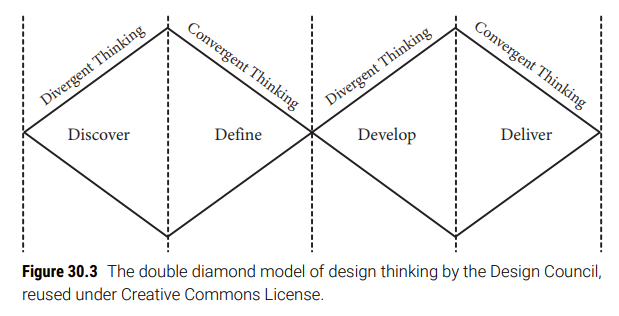
Discovering Requirements
- This activity covers the Discover and Define phases of the double diamond of design.
- It is focused on discovering something new about the world and defining what will be developed.
- In the case of interaction design, this includes understanding the target users and the support an interactive product could usefully provide.
- This understanding is gleaned through data gathering and analysis.
- It forms the basis of the product’s requirements and underpins subsequent design and development.
- In the case of interaction design, this includes understanding the target users and the support an interactive product could usefully provide.
Designing Alternatives
- This is the core activity of designing and is part of the Develop phase of the double diamond.
- It is about proposing ideas for meeting the requirements.
- For interaction design, this activity can be viewed as two sub-activities:
- Conceptual design
- Involves producing the conceptual model for the product.
- A conceptual model describes an abstraction outlining what people can do with a product and what concepts are needed to understand how to interact with it.
- Concrete design
- Considers the detail of the product including the colors, sounds, terminology, and images to use, menu design, and icon design.
- Alternatives are considered at every point.
- Conceptual design
Prototyping
- Prototyping is also part of the Develop phase.
- Interaction design involves designing both the behavior of interactive products and their appearance.
- The most effective way for people to evaluate designs is to interact with them, and this can be achieved through prototyping.
- This does not necessarily mean that a piece of software is required.
- There are different prototyping techniques, and many do not require high fidelity.
- For example, paper-based prototypes are quick and cheap to build and are effective for identifying problems in the early stages of design
- Through role-playing, people can get a real sense of what it will be like to interact with the product
Evaluating
- Evaluating relates to the Deliver phase of the double diamond, in terms of testing solutions
- at a small scale.
- It is the process of determining the usability and acceptability of the product or design measured in terms of a variety of usability and user-experience criteria.
- Evaluation does not replace activities concerned with quality assurance and testing to make sure that the final product is fit for its intended purpose, but it works alongside them.
- The activities to discover requirements, design alternatives, build prototypes, and evaluate them are intertwined:
- Alternatives are evaluated through the prototypes, and the results are fed back into further design or to identify alternative requirements.
- The activities to discover requirements, design alternatives, build prototypes, and evaluate them are intertwined:
Design Process Models
Design Council Framework for Innovation
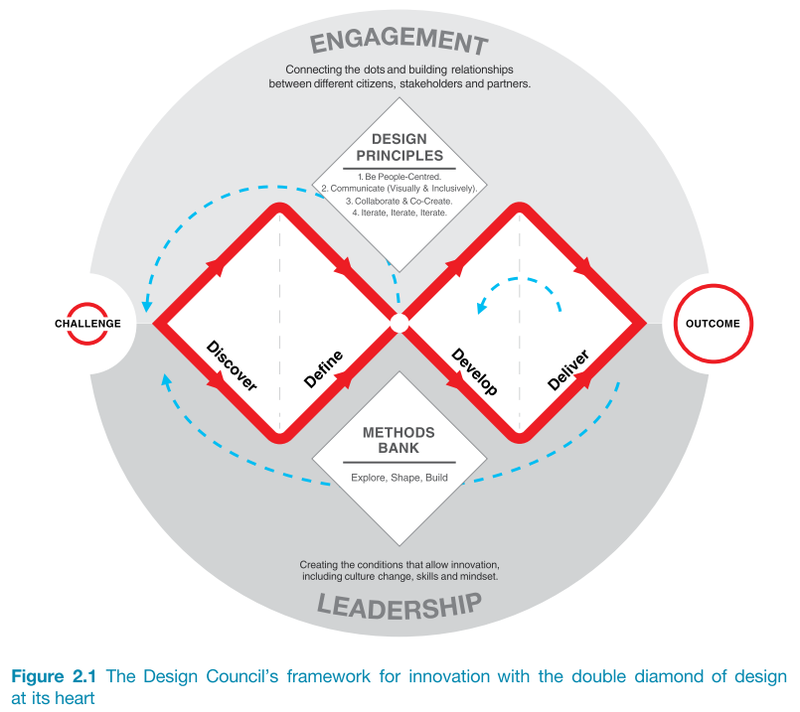
- In the Design Council's framework, feedback is indicated by dashed lines.
- The double design is at the core of the model, with additional aspects that influence it added.
Simple Interaction Design Lifecycle
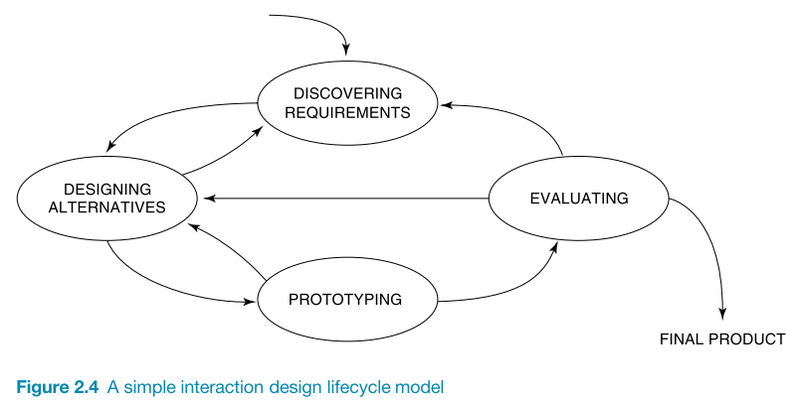
- In this model feedback is indicated by solid lines.
- This model is a simplified version of the international standard model ISO 9241-210.
ISO 9241-210
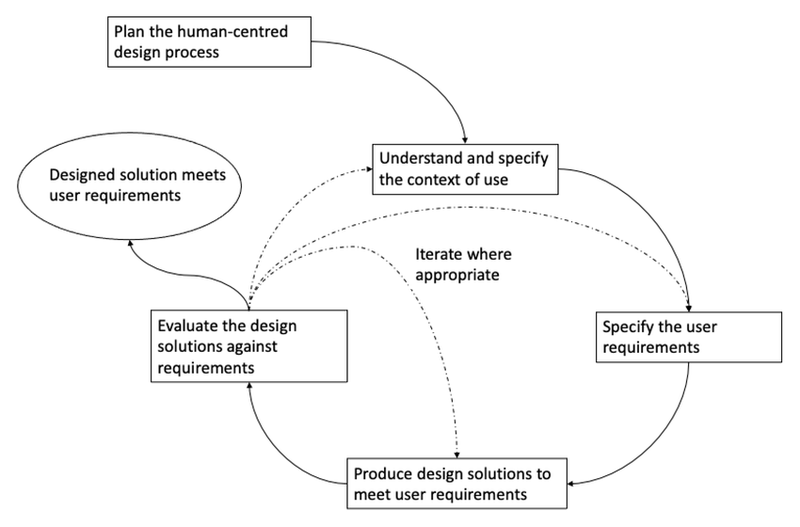
- The model starts with planning the design process and ends with a final design solution that meets requirements.
- The model contains a central loop, where each stage can be iterated based on feedback gained through evaluation.
- Many projects start by discovering requirements from which alternative designs are generated.
- Prototype versions of the designs are developed and then evaluated.
- During prototyping or based on feedback from evaluations, the team may need to refine the requirements or to redesign.
- One or more alternative designs may follow this iterative cycle in parallel.
- Implicit in this cycle is that the final product will emerge in an evolutionary fashion from an initial idea.
- Exactly how this evolution happens varies from project to project.
- However many times the product goes through the cycle, development ends with an evaluation activity that ensures that the final product meets the prescribed user experience and usability criteria.
- This evolutionary production relates to the right side of the double diamond, but note that in this interaction design process, any of the stages may be revisited.
Design Sprints
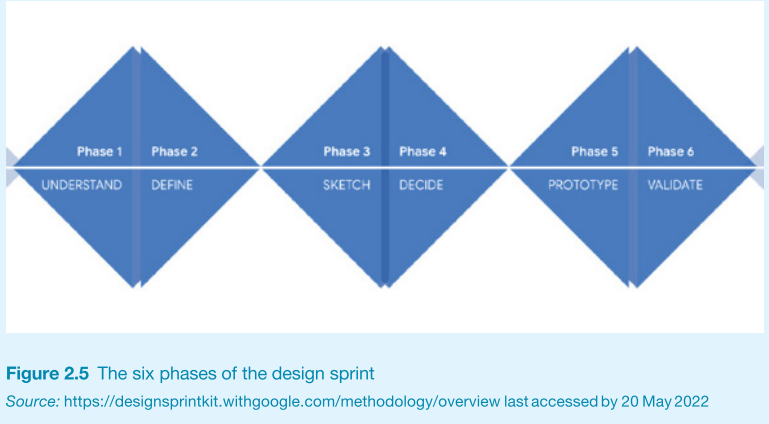
- The design sprint is a flexible framework and set of methods to solve problems through an iterative process of designing, prototyping, and rapid testing with low investment and in a realistic environment.
- Every sprint starts with planning.
- Pre-sprint (Planning):
- Write a sprint brief, choose the right design challenge, assemble the right team, and organize the time and space to run the sprint.
- Phase 1 (Understand):
- Experts from across the business articulate the problem space.
- Phase 2 (Define):
- Evaluate what was learned in Phase 1 and identify a focus for the sprint.
- Phase 3 (Sketch):
- Generate many ideas and alternative solutions; then work as a team to identify a single well-developed solution per team member.
- Phase 4 (Decide):
- Choose the single idea to be progressed through the design sprint.
- Phase 5 (Prototype):
- Develop a prototype for the chosen solution that isjust real enough to validate and covers only the aspects you want to test.
- Phase 6 (Validate):
- Gather feedback on the prototype from users and other stakeholders.
- At the end of this phase your chosen solution will be validated, or not!
- Pre-sprint (Planning):
- An important aspect of the design sprint is that it is time-limited, with each phase often lasting around a day.
Research in the Wild
- Research in the wild (RITW) develops technology solutions in everyday living by creating and evaluating new technologies and experiences in situ.
- The approach supports designing prototypes in which researchers often experiment with new technological possibilities that can change or disrupt behavior, rather than ones that fit in with existing practices.
- The results of RITW studies can be used to challenge assumptions about technology and human behavior in the real world and to inform the re-thinking of HCI theories.
- The perspective taken by RITW studies is to observe how people react to technology and how they change and integrate it into their everyday lives.
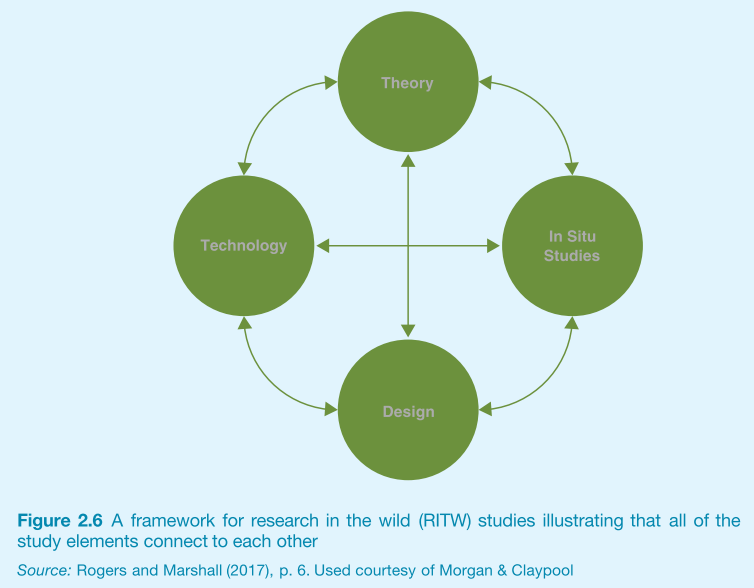
- The model consists of 4 stages:
- Technology:
- Concerned with appropriating existing infrastructures/devices in situ or developing new ones for a given setting.
- Design:
- Covers the design space of an experience.
- In Situ Studies:
- Concerned with evaluating in situ an existing device/tool/service or novel research-based prototype when placed in various settings or given to someone to use over a period of time
- Theory:
- Investigating a theory, idea, concept, or observation about a behavior, setting, or other phenomenon; using existing ones; or developing a new one, or extending an existing one.
- Technology:
Reflective Transformative Design Process
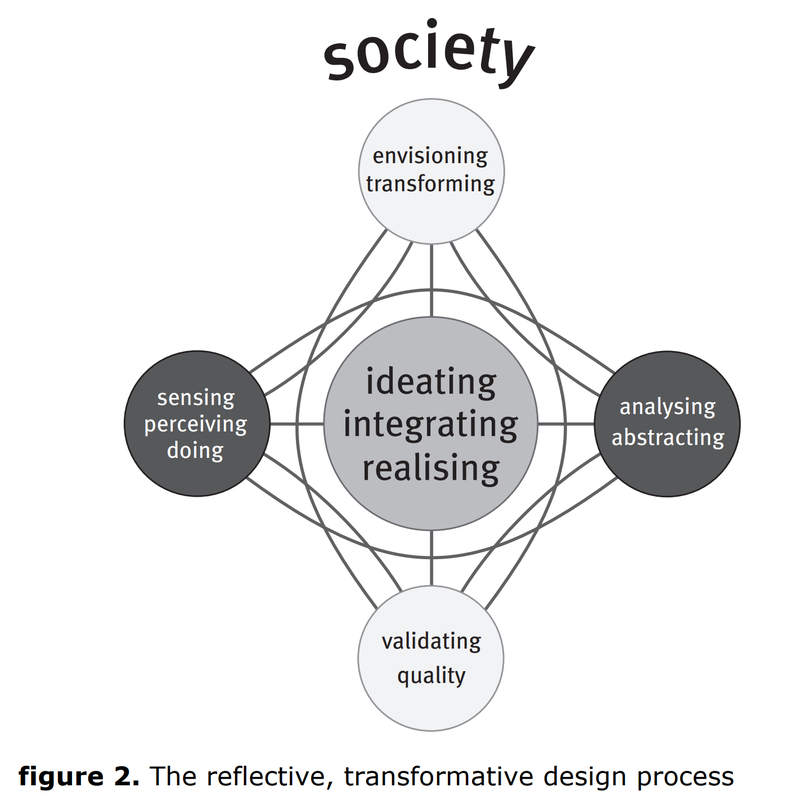
- The reflective transformative design process (RTDP) consists of 5 interconnected activities.
- The steps do not follow a particular order and are dependent on context.
- The grey circles represent the skills a designer needs.
- The right circle is about cognitive skills.
- The left circle is about motor skills.
- The white circles represent the vision and evaluation of designs.
- The top circle is about the vision and goal of a design.
- The bottom circle is about testing and validating a design.
- The large central circle is about ideating and realizing designs.
- This activity eventually results in the final design.
Sources: